Spendee
Google Certificate Assignment Case Study
Project Overview
The Product: As a portfolio assignment for the Google certified UX Design course, I chose the following prompt to base my assignment on;
-
Design an app that helps friend or family groups manage a household budget and save up for a common goal (such as a vacation).
I decided to design a (fictional) budgeting app, named Spendee. The function of the app is for users to track their expenses. Users can insert their income, and can add their (expected) expenses to get an overview of their financial health. Users can add ‘mock’ expenses to calculate if a certain purchase has an impact on their financial health. The app uses an AI calculation model to calculate a user's financial health. Users can also add saving goals, to keep track of their saving progress, and groups for shared expenses (like friend groups for friend activities, or shared household expenses)
I actively worked on the project during the entire course of the UX design training program, which was from november 2024 until april 2025.
User Research
To better understand the needs of potential users, I conducted user research through 10 semi-structured interviews with individuals, some of which from various household and group dynamics, including people with families and roommates. Going into the research, I assumed that most users already used existing budgeting apps but needed additional features like an A.I calculated Financial Health Score, mock expenses and goal tracking. I discovered that many participants avoided traditional budgeting apps due to their complexity and perceived them as unnecessary. Instead, they relied on informal methods like spreadsheets, group chats, and manual calculations. However, I discovered that many participants are often unsure about making certain expenses, whether these are individual or for a group such as a household, and have difficulty visualizing progress toward goals. These insights confirmed my initial plan to focus the app on rating (mock) expenses, calculating a users’ financial health and having a way for users to work towards a saving goal.
Based on the research I defined the following pain points;
Pain Points Users Experience
-
Lack of Financial Visibility: Many people struggle to track their income and expenses accurately. The app will provide a clear, real-time snapshot of their financial situation, helping them understand where their money goes.
-
Budgeting Challenges: Budgeting can be overwhelming for users who don't know how to set realistic limits. Your app's advice on expenses will guide users in making smarter financial decisions, such as cutting back on unnecessary costs or reallocating funds to savings.
-
Poor Financial Decision-Making: Without insights, users often make decisions that aren't aligned with their long-term financial goals. The app will offer tailored advice based on their financial health score, helping them optimize spending for better financial outcomes.
-
Lack of Financial Education: Many people lack the financial literacy to assess their spending habits effectively. By generating a financial health score, the app will help users better understand their financial behaviors and improve their financial literacy over time.
-
Overwhelming Debt or Expenses: For users struggling with debt or high expenses, the app will highlight areas where they can cut back or adjust spending, which can lead to reduced financial stress.
User Personas
User personas in UX design are made-up characters based on real research that represent different types of users, helping UX designers create products that fit their needs and goals. I built the following User Persona’s based on the research interviews;
Persona 1: Sarah, The Busy Professional
-
Age: 32
-
Occupation: Marketing Manager
-
Income: $70,000/year
-
Tech Comfort: High
-
Goals:
-
-
Sarah wants to better understand her spending habits to start saving for a down payment on a house. -
She’s looking for a way to reduce unnecessary expenses, like impulse purchases, and allocate more toward savings.
-
-
Challenges:
-
Sarah’s busy work schedule leaves her little time to track expenses manually.
-
She often feels overwhelmed by her bills and subscriptions, and doesn’t know how much she should be spending each month.
-
-
How the App Helps:
-
The app will allow Sarah to quickly input her income and expenses, showing her a clear view of her financial health score.
-
The app will identify areas where she can cut back (e.g., recurring subscriptions or dining out), offering personalized advice to help her save for her home.
-
Regular reminders and easy-to-read charts will keep her on track without needing to devote hours to budgeting.
-
User Story: “As a busy marketing manager, Sarah wants to easily track her income and expenses so that she can save for a down payment on a house without spending too much time on managing her finances.”
Persona 2: James, The Recent College Graduate
-
Age: 24
-
Occupation: Junior Software Developer
-
Income: $50,000/year
-
Tech Comfort: Medium
-
Goals:
-
James is looking to get out of debt (student loans and credit cards) and build his credit score.
-
He needs help understanding how to budget his income, especially since he’s just starting out with managing his finances.
-
-
Challenges:
-
James has never created a budget before and doesn’t know where his money is going each month.
-
He often spends impulsively on entertainment and eating out, which has left him with little savings or ability to pay down debt quickly.
-
-
How the App Helps:
-
The app will provide an easy-to-understand financial health score and track James’ debt progress, helping him prioritize paying off high-interest debts first.
-
It will give advice on how to adjust spending habits, offering tips on saving more by cutting back on non-essential items.
-
Push notifications and weekly reports will help James stay motivated and track improvements over time, setting him up for long-term financial stability.
-
User Story: “As a recent college graduate, James wants an easy way to understand and manage his finances so that he can pay off his student loans and build a stronger credit score without feeling overwhelmed.”
Value Propositions
-
Comprehensive Expense Tracking
Easily log daily expenses and income streams to gain a clear, real-time overview of your financial situation. Categorize transactions for better budget management and visibility into spending patterns. -
AI-Powered Financial Health Insights
The app goes beyond simple expense tracking—it uses an advanced AI model to assess your financial health dynamically. The AI provides personalized recommendations and insights, helping users make smarter financial decisions. -
Smart Planning with Mock Expenses
Thinking about making a big purchase? Add ‘mock’ expenses to simulate potential financial impacts before committing to a purchase. This proactive planning helps prevent overspending and ensures financial stability. -
Goal-Based Savings Tracker
Define and track savings goals—whether for a vacation, emergency fund, or a big purchase. The app helps users visualize progress and stay motivated with real-time tracking and goal-setting tools. -
Group Expense Management for Seamless Splitting
Easily manage shared expenses with family, friends, or roommates. Whether splitting a dinner bill or handling household expenses, the app ensures fair and transparent cost-sharing to avoid misunderstandings and keep finances organized. -
Personalized Financial Recommendations
The AI-driven insights provide customized budgeting suggestions and highlight spending habits, empowering users to make smarter decisions tailored to their financial behavior.
Product Goal Statement:
Our budgeting app empowers busy professionals and young adults to take control of their finances effortlessly. By leveraging AI-driven insights, intuitive expense tracking, and goal-based savings tools, we provide a seamless and personalized budgeting experience. The app helps users like Sarah and James understand their spending habits, reduce unnecessary expenses, and achieve financial milestones—whether it’s saving for a home or paying off student loans. With real-time financial health assessments, smart planning features, and automated reminders, we make budgeting simple, efficient, and stress-free.
Design
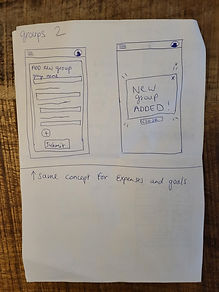
To kick off the design process, I began by sketching wireframes to define the core functionality and user flow of the app.
After refining a few concepts, I settled on a layout and flow that aligned well with the app's objectives. I then transitioned to Figma, where I translated the wireframes into a digital format.
Once I was confident with the layout and user flow in Figma, I moved forward to develop a low-fidelity prototype to validate and test the overall user journey.
Design Research
To test my designs, I conducted usability studies to discover any missed pain points, issues with the user flow, or even missing features that could be added to the app to give the app more value. I created the following research plan;
Affinity Diagram
After running usability studies, I systematically analyzed my notes, identifying recurring patterns, pain points, and friction points in the user experience. I then synthesized these insights by categorizing key quotes, observations, and ideas into thematic groups. To visualize my discoveries, I structured them into a digital affinity diagram.
Themes, Insights and Iteration.
Building on the insights synthesized from the usability study and mapped out in the affinity diagram, I refined my low-fidelity prototype with key iterations. I expanded functionality by introducing more options for adding expenses, savings goals, and groups, while enhancing navigation clarity to previous pages. These adjustments aimed to improve usability and create a more intuitive user flow, resulting in the updated low-fidelity prototype below.
Final Hi-fidelity Prototype
For the high-fidelity prototype, I enhanced the visual appeal by incorporating color, fonts, and iconography. I also refined the layout by adjusting the position and size of the 'add' button, and added text labels to the buttons for better accessibility. Throughout the process, I gained valuable insights, particularly into Figma's workflow and the practical application of elements from Design Systems like Material.io. This assignment has equipped me with the knowledge and skills to seamlessly apply these learnings to upcoming real-world projects.